Workboard
A per-workspace kanban board for human work and AI agent cards — with a dedicated lane for Claw proposals awaiting approval.
What it is
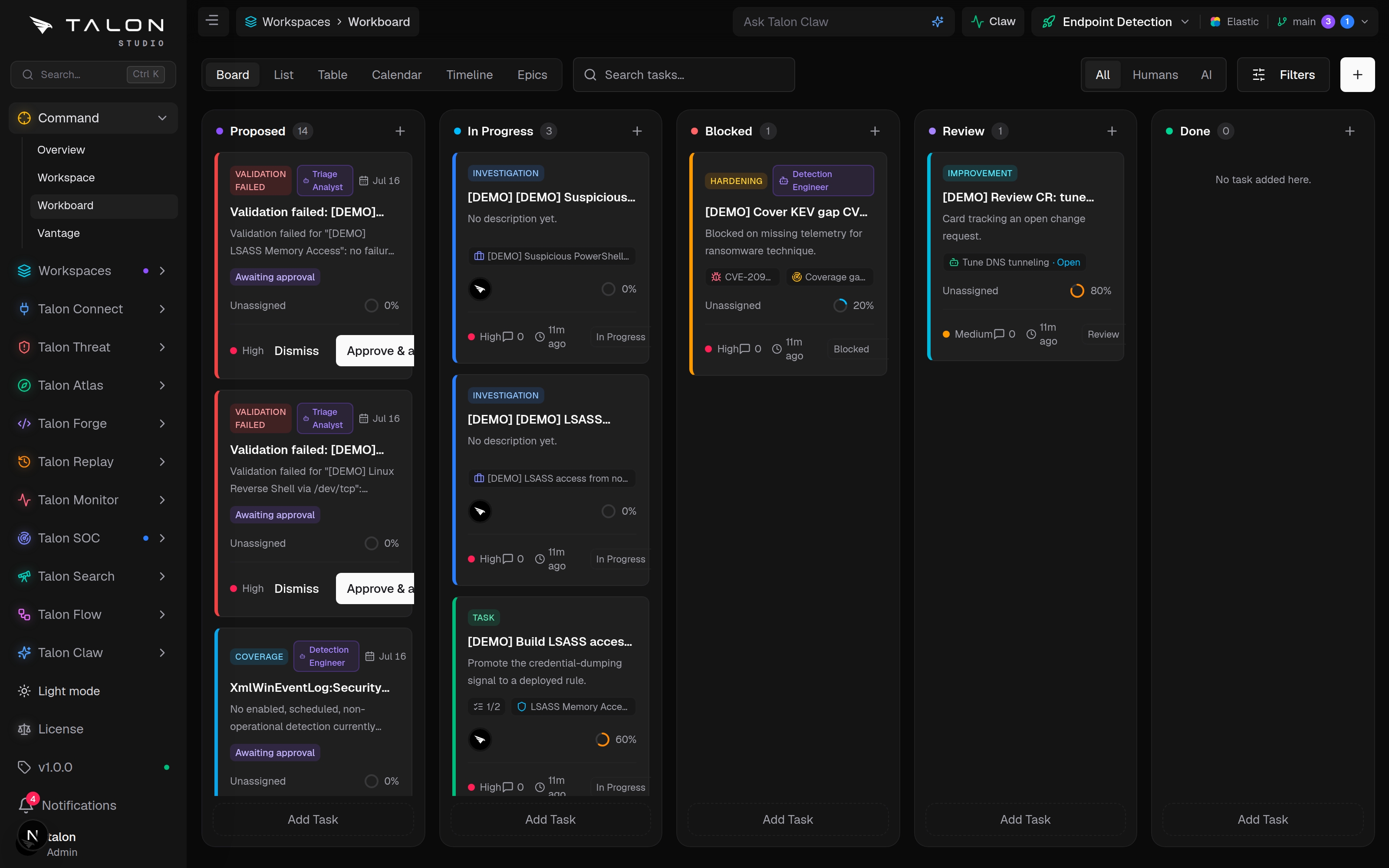
The Workboard (/workspaces/<id>/board, reached from Command → Workboard) is a kanban board scoped to a workspace. It tracks the detection-engineering work in flight — tasks, investigations, bugs, incidents and hardening — alongside cards raised by Talon Claw, so human and agent work sit on the same board.
Columns & cards
The columns are fixed — Proposed, In Progress, Blocked, Review, Done. You can't add, rename or reorder them; every board maps to the same four work states (plus the Proposed lane), so boards stay comparable across workspaces. There is no backlog lane — new cards land directly in In Progress.
A card carries a type (epic, task, investigation, bug, incident, improvement, hardening), priority (High, Medium, Low), progress, assignees, labels, subtasks and a due date. It can link to the thing it's about — a coverage gap, detection, CVE, change request, SIEM, rule-health finding, SIEM fix, SOC case or notable — and a linked change request shows its live status badge on the card. Cards can also be related to each other (blocks, blocked by, relates to, duplicate of).
The Proposed lane
The left-most Proposed lane is where Claw's proposals land (this replaced the standalone Claw Board). Each proposal shows its signal — a coverage gap, validation or pipeline failure, a new KEV CVE or an uncovered one, a noisy detection, a rule with broken references or one that never fires, or techniques from a pasted threat-intel report — plus the agent that would take it and why.
Claw's scan cycle only raises proposals for an organisation that has switched on the Claw coordinator in Talon Claw → Settings (/connect/ai). It is off by default, so until an admin turns it on the only proposals you'll see are the ones raised when someone analyses a threat-intel report.