From an empty Linux host to a signed-in Studio on your Community key, then your first detection: get the key, run the installer, put a proxy in front, sign in as the first admin, paste the key, and walk the product loop. The Install page has every step at length.
What it is
This quickstart takes you from an empty host to a validated detection running in your SIEM. Talon Studio is a single Docker image, so there is nothing to assemble: the installer writes a compose file and a .env beside it, and starts the app with a persistent /data volume, beside a kokoro container that speaks the assistant's replies. On first boot it creates the first admin with a generated password.
You'll install the appliance, sign in as the first admin, paste your Community key, create a workspace, connect a SIEM, review your ATT&CK coverage in Atlas, author a detection as code in Forge, validate it in Monitor, and ship it through the release pipeline. Every step lives inside the same platform.
How it works
The container runs one Next.js process (UI, API, and background workers) alongside an embedded PostgreSQL database and an embedded pySigma sidecar for Sigma validation and SIEM query translation. Both listen on 127.0.0.1 inside the container; only the app's port 3000 is published, on the host's loopback. All durable state — the database, one Git repo per workspace, the content clones and any secret the appliance generates — lives on the mounted /data volume.
Detections are stored as Git-backed YAML, so the appliance is the source of truth and your work is portable from the first commit. Once you are signed in, the loop is: Connect → Atlas → Forge → Monitor → release pipeline.
Before you start
Your Community key: create a Talon Labs account, and the key is on your account page and in the welcome mail. It is free, never expires, and never contacts Talon Labs.
A Linux host with Docker Engine, Compose v2 and curl, 2 vCPU and 4 GB of RAM, and a DNS name pointing at it. No host? Rent one.
Five steps
1
Run the installer — read it first, then run it:
terminal
curl -fsSL https://www.talonlabs.dev/studio/install.sh -o install.sh && less install.sh && sh install.sh
It asks for the address your proxy will answer on, generates the secrets, and starts Studio in ./talon-studio.
2
Save the encryption key it shows you, in your password manager, and type saved. Nothing starts until you do; a restored backup without this key is ciphertext.
3
Put the printed Caddyfile in front — the app listens on 127.0.0.1:3000 only, and a proxy with TLS is the way in.
4
Sign in as the first admin. Studio makes its password on the first boot, a few minutes after it starts. Read it in ./talon-studio:
Open your origin, sign in with the username or email from the file, and choose a new password — the first sign-in goes straight there. Then delete the file, as First sign-in shows.
5
Paste your Community key on the key screen you land on after signing in. The instance is then the Community Edition: the whole detection workflow, for two users, one workspace and one SIEM connection.
Usage
Once you're signed in, walk the loop:
1
Create a workspace. A workspace is the Git-backed unit of detection engineering. With no workspace yet, the Quick Start dialog opens: name the workspace, pick its SIEM target, optionally connect that SIEM in the same step, and click Create workspace. The Community Edition allows one workspace.
2
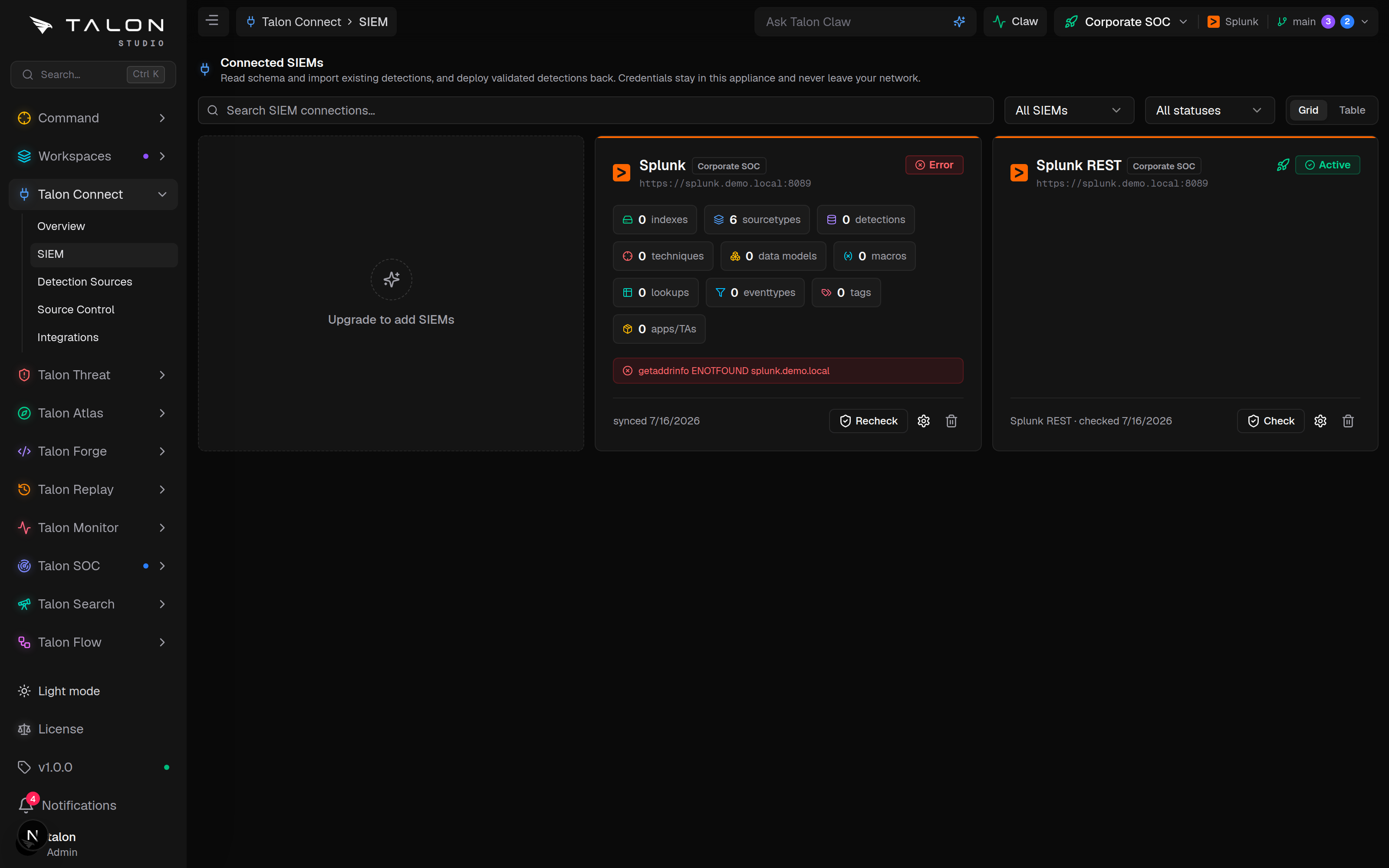
Connect a SIEM. Go to /connect/siem and add Splunk, Sentinel, Elastic, or Chronicle, if you did not in the Quick Start dialog. Connect introspects the platform — its indexes, sourcetypes, and fields — to build your Evidence Grid of what you can actually detect. The Community Edition allows one SIEM connection.
3
Review coverage in Atlas. Open /atlas to see your detections mapped onto MITRE ATT&CK against that evidence, so gaps are grounded in real telemetry rather than a wish list.
4
Author a detection. In /forge, write Sigma or a native SIEM query with live translation to your SIEM's query language. Saving writes the detection to Git as YAML.
5
Validate in Monitor. Run validation at /validate to prove environment readiness, with Atomic Red Team simulation as an optional bonus signal. Results travel with the detection and are stamped into the deployed package as evidence — the release pipeline's gates govern the deploy itself.
6
Ship it. Promote through the release pipeline. Talon converts the rule to the target SIEM on deploy; main is production truth, and rollback is one click.
The Talon Connect → SIEM screen. Click Connect SIEM, pick your platform, and paste the host and API token — the connection saves as pending and Connect verifies it on its first evidence sync.
Talon Forge → Builder
The Talon Forge → Builder screen. Write Sigma on the left — the translation preview re-renders your SIEM's query on a typing pause — then click Save detection to write the YAML to Git.