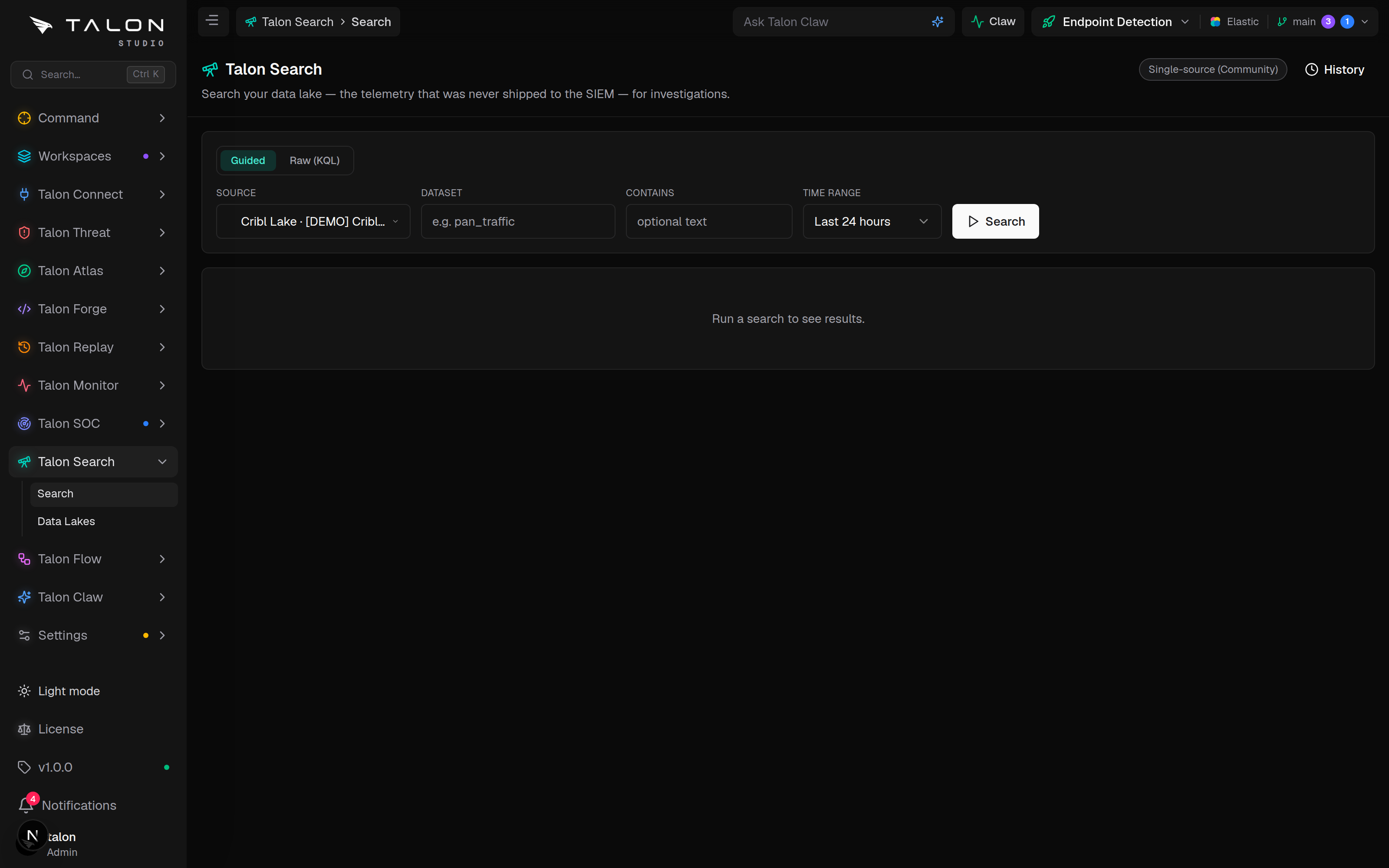
Read-only investigation search over your Cribl Lake and connected SIEMs — one source at a time on the Community Edition, or several at once, merged and attributed by source, on Enterprise.
What it is
An analyst can only pivot on data that lives in the SIEM, but the point of a pipeline like Cribl is that high-volume, low-signal telemetry is deliberately not shipped there. Talon Search queries it where it sits — in Cribl Lake — and can query your connected SIEMs through the same bar, without moving or re-indexing anything.
It is the investigation counterpart to everything Talon does on the authoring side, and a result can become a detection: Build detection opens the Forge builder with the query.
/search
Search — guided or raw query, source picker, time range, a results grid attributed by source, and your workspace's search history.
/search/data-lakes
Data Lakes — switch search access on or off for the Cribl connections you have added.
Cribl LakeSplunkSentinelElasticRead-onlyAudited
Cribl Lake search is in beta
Talon says so on the page: the Cribl Lake source has not yet been validated against a live Cribl instance. Expect rough edges in how guided queries and results come back from the lake.
How it works
Each source sits behind the same interface, so adding a source means adding an adapter, never widening access.
Sources. A Cribl Lake search is submitted as a job to the Cribl Search API and polled until it completes. A SIEM search runs through the connection's existing read path: Splunk searches a sourcetype, Microsoft Sentinel a table, and Elastic a data stream. Google SecOps (Chronicle) connections are not searchable yet.
Fan-out. When a query goes to more than one source, Talon sends it to all of them in parallel, keeps one source's failure from sinking the rest, and returns each source's rows attributed to it. Cribl Lake sources are always listed first.
Two modes.Guided — pick a dataset (a sourcetype, table, data stream or lake dataset), a time range and optional filter text, and Talon builds a safe query for each source. Raw KQL — write a Cribl query and run it as written against Cribl Lake.
Read-only. Guided queries are built only from read commands, with the filter text sanitised. A raw query that pipes to export, send, output, delete or write is refused before it runs.
Bounded. The time range is a relative window of at most 30 days (default 24 hours). Each source returns up to 100 rows from the page; the API accepts up to 500.
Timing. Each source's job is polled every 500 ms for up to 60 seconds, after which it is cancelled and reported as "Search timed out."
Audited. Every search that runs writes one audit row per source — the query, the time range, the outcome and the row count — to the same table as agents' SIEM queries, with no agent set. History shows the workspace's last 20 searches and reloads any of them.
Setup
Search needs a source with search access switched on. Every source is off until someone turns it on.
1
For a Cribl Lake: add a Cribl connection under Connect → Integrations, then on /search/data-lakes switch on its Search toggle. See Data Lakes.
2
For a SIEM: open the connection in Connect → SIEM and switch on Allow agents to query (read-only). That switch is what makes a SIEM searchable.
3
Select a workspace and open /search. With more than one source, a source picker appears; All sources (federated) is offered only on Enterprise.
Search access rides the agent-access switch
A SIEM becomes searchable through the same per-connection setting that lets Talon agents run read-only queries against it. Switching it on for Search also opens that connection to agents, and switching it off removes it from both.
Federation is Enterprise
The Community Edition searches one source at a time — any enabled source, SIEM or Cribl Lake — and the page header reads Single-source (Community). Searching more than one source in one query is Enterprise, which is in development and not yet on sale; a multi-source search on Community is refused with a prompt to pick one. The gate is on how many sources one query reaches, not on which sources you connect.
Usage
Guided mode gets analysts productive without learning a query language; Raw KQL gives investigators the full lake engine.
1
Guided. Type or pick a dataset (known datasets are suggested, and the empty page offers a few), choose a time range (last hour, 24 hours, 7 days or 30 days), add optional filter text, and press Search. Results come back once every source has finished or reached the 60-second limit.
2
Raw KQL. Write a Cribl query (for example against a lake dataset) and run it. It is still read-only and still audited.
3
Read the grid. Each source's results are shown under its own label, with a note when a source failed, timed out or was truncated, and a fields sidebar to filter on common values.
4
Pivot on a value. Click any value in the grid: Talon puts it in the filter text and switches to guided mode. Press Search to run the pivot.
Guided mode: pick a dataset and time range, choose a source in the picker (All sources (federated) on Enterprise), and search. Click any value in the results to set up a pivot onto it.
Raw runs against the lake only
A raw query only ever runs against Cribl Lake: SIEM sources are dropped from it, and if you picked only a SIEM, Talon asks you to pick a lake or switch back to Guided.
Fields are not normalised across sources
Rows keep each source's own field names — Splunk's src_ip and Sentinel's SourceIP stay separate columns under their own source.