The governed release pipeline: vendor artifacts converted on deploy, readiness checks, branch-bound targets, auto-deploy and per-detection rollback.
The release pipeline
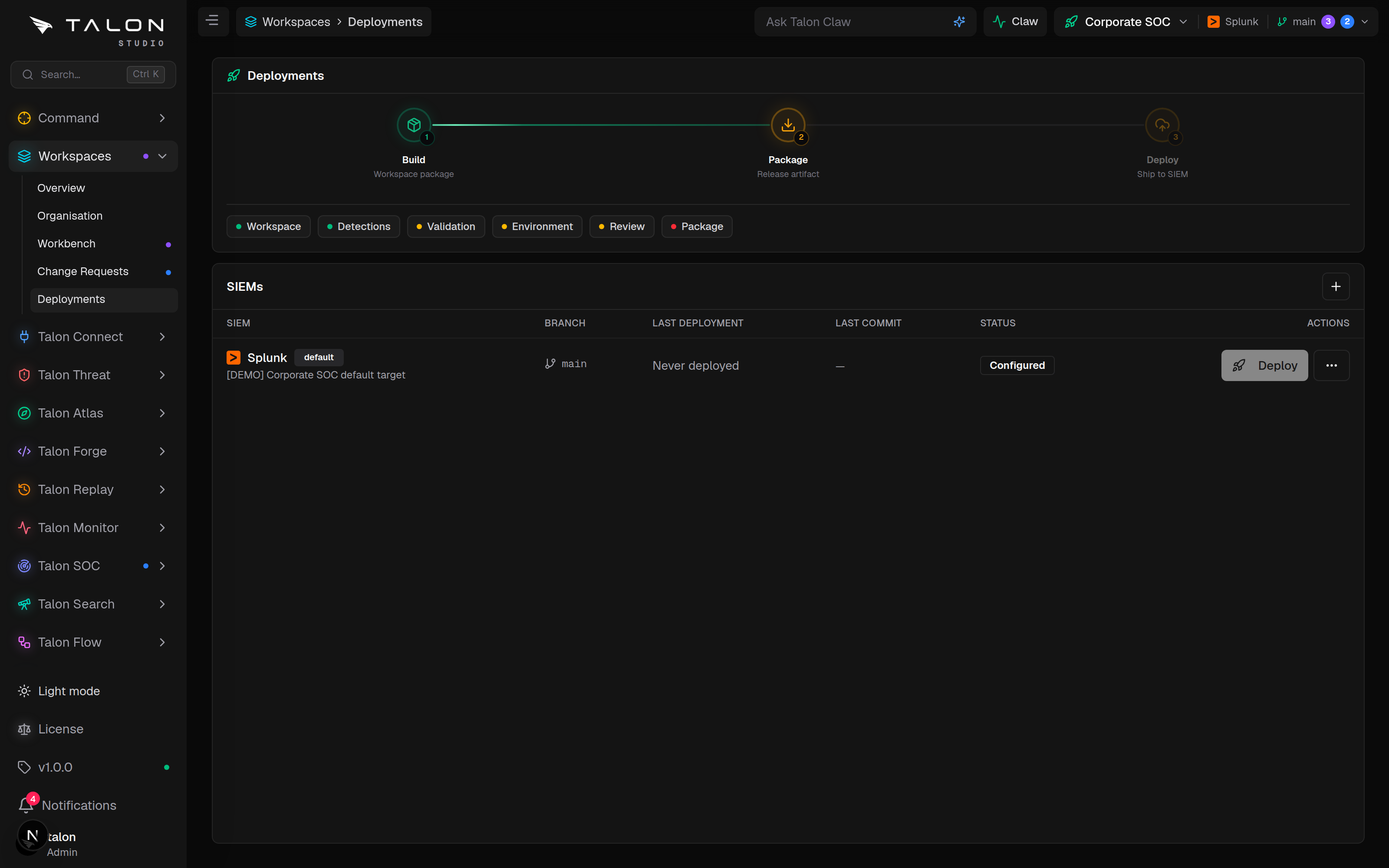
Detections reach a SIEM through Workspace → Deployments (/workspaces/<id>/deployments). The page shows the Build → Package → Deploy pipeline, the readiness checks, and a SIEMs table with one row per deployment target. Only committed detections ship: an uncommitted draft goes through commit and package first, never as a one-off push.
Connect
SIEM linked
Forge
saved to Git
Validate
signal only
Review
CR approved
Package
app built
Deploy
per-SIEM lane
Merging the change request (or committing to main) rebuilds the package. Package and Target are the gates that govern a release, plus Validation when a detection fails environment readiness; Review and behavioural or simulation validation warn but never block (an org can opt into block).
Review is a signal, not a gate
An open or approved change request elsewhere warns but never blocks, since it lives on its own branch and main's committed state is what ships. The checks that fail a release are Package (no current build), Target (readiness check stale or failed) and Validation when a detection fails environment readiness.
What each SIEM receives. Artifacts are also written to Talon/deployments/<siem>/ in the repository, and Download artifacts exports them.
Splunk: a Talon app package with the detections as savedsearches.conf stanzas, installed through Splunk Cloud ACS, the Splunk REST API, or SSH for Splunk on-prem.
Sentinel: an analytics-rule JSON per detection, pushed over the Azure REST API.
Elastic: a detection-rule JSON per detection, pushed through the Elastic Security API.
Chronicle: a YARA-L rule per detection, pushed over the Chronicle REST API. Chronicle pushes are not read back to verify them.
Targets & rollback
Add a target with + on the SIEMs table. Each row has a Deploy button and a menu with Check readiness, Download artifacts, Make default, Auto-deploy this branch, Edit target and Delete target. Adding and changing targets needs the workspace engineer role.
Workspace → Deployments: the Build → Package → Deploy pipeline, the readiness checks, and the SIEMs table. Run Check readiness from a target's menu first, then Deploy.
1
Check readiness asks for the target's token (an ACS token and an AppInspect token for Splunk Cloud) and runs Check Target, which confirms the target is reachable and authorised to install.
2
Deploy installs by mode (acs, push, export or auto) and records the attempt with status success, failed, pending or exported. A failed deploy fires any Deploy failed flows and can raise a Claw proposal.
3
Roll back a detection with Roll Back Deploy on its page in Talon Forge: Talon re-pushes the artifact recorded for its previous successful deployment. Available for Splunk, Sentinel, Elastic and Chronicle.
Auto-deploy
Off by default. When on, a commit or merge to the target's bound branch (main unless changed) installs automatically, provided the target has stored credentials. Sentinel, Elastic and Chronicle auto-deploy from main only.
Community Edition
One deployment target across the whole install, counted org-wide. Adding a second is refused with "Deployment target limit reached (1/1)".
Deploying a branch
Deploying from a branch other than main (a staging branch to a test SIEM, say) is refused in the Community Edition: "Deploying a branch other than main is an Enterprise feature, and Enterprise is in development."
Tip
Run Check readiness before every real deploy. It catches an unreachable or unauthorised target up front, so a bad credential or network path fails fast instead of leaving a half-applied deployment.
Package staleness. The Package check warns when the current build predates the latest committed detection change, telling you to commit pending changes or check App Logs for a failed auto-build, rather than silently deploying an out-of-date package.
Target readiness expires. A target counts as ready only when its last check is under 30 minutes old and confirmed it can install the package; an older check blocks deploy again even if it once passed.