An Enterprise console that pulls the alerts your deployed detections fire — plus CrowdStrike detections and ServiceNow incidents — into one analyst queue, maps each to its detection, and works it through cases to a disposition.
What it is
Talon SOC needs an Enterprise licence
Alerts reach the SOC only from workspaces with Feed alerts into Talon SOC switched on, and switching it on is refused without an Enterprise licence. Enterprise is in development and not yet on sale (see Licensing). On the Community Edition the SOC pages open, but they stay empty.
Detections normally flow outward: authored in Forge, packaged, deployed to the SIEM. Talon SOC catches what those detections fire and brings it home — pulling alerts back from Splunk, Microsoft Sentinel, Elastic Security and Google SecOps (Chronicle), plus CrowdStrike Falcon detections and ServiceNow incidents, into one analyst queue. Each alert is tied to the detection that produced it, and analysts work it from queue to case to disposition.
The payoff is a closed loop: a false-positive disposition sends an analyst straight back to the detection in Forge, and can have the SOC Analyst agent propose the fix.
/soc
Overview — open alerts, active cases, critical and high alerts, resolved cases, a per-workspace breakdown, case outcomes, open alerts by severity, and previews of the queue, active cases and roster.
/soc/queue
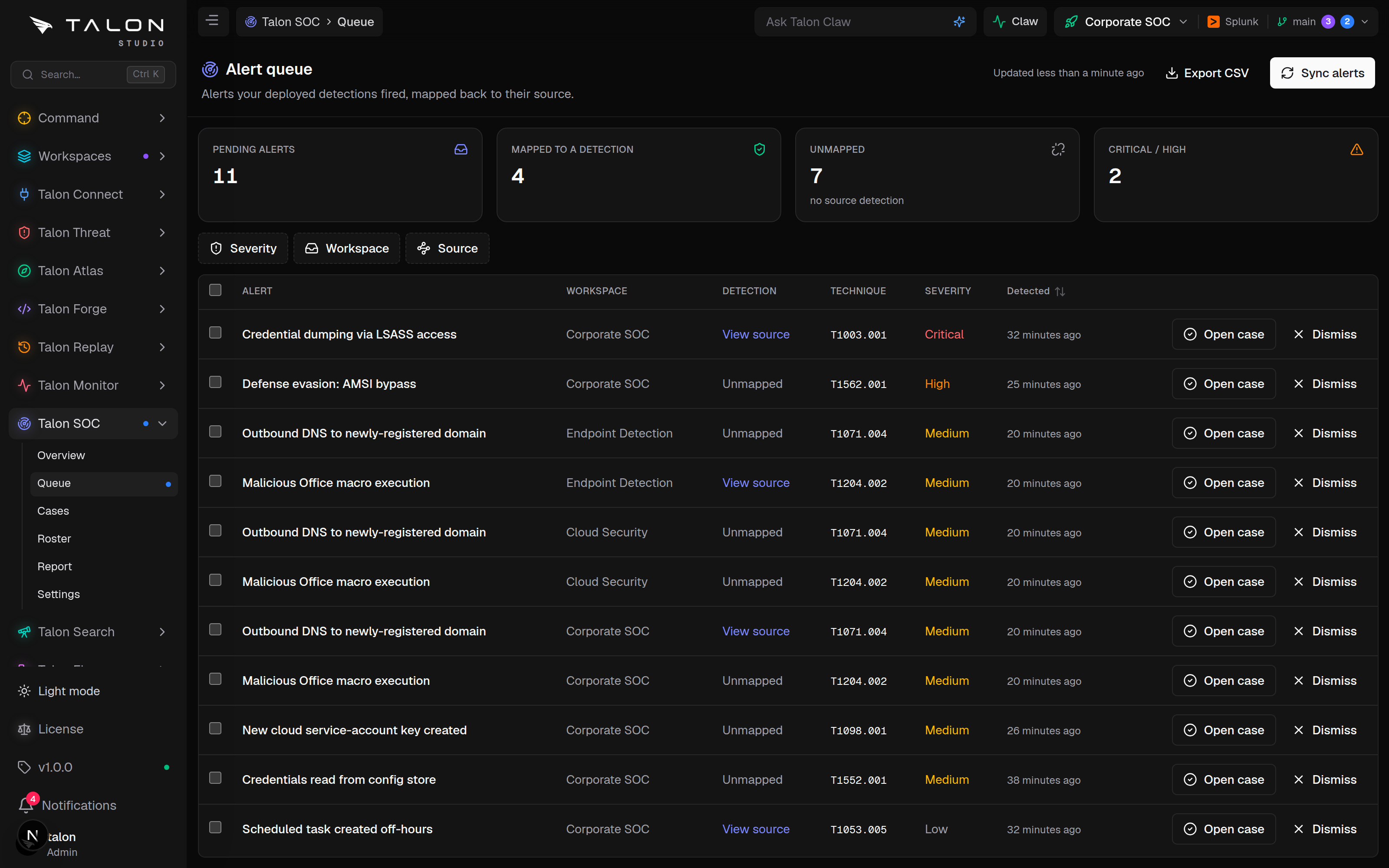
Queue — pending alerts from every source; open a case from one or dismiss it.
/soc/cases
Cases — the case list and each case's detail: raw alert fields, source detection, status, priority, disposition, assignee, threat-intel matches and an activity timeline.
/soc/roster
Roster — the analysts in SOC workspaces, with presence, on-call status and open-case load.
/soc/report
Report — volumes, dispositions, true-positive rate and average time to resolve over 7, 30 or 90 days.
/soc/settings
Settings — Slack, Teams and PagerDuty channels, Jira and ServiceNow ticketing, and the on-call schedule.
Org-wide, opt-in per workspace
SOC is not scoped to the active workspace. An analyst sees alerts across every workspace they can access that also feeds the SOC. The switch lives in each workspace's settings, and only the workspace's owner can change it.
How it works
A returned alert has to say which detection fired, and it already does. Talon deploys every Splunk detection as a saved search named Talon - <technique> - <name>, and its notables carry that name as search_name. The SOC recomputes those names for each workspace detection and matches on them, so nothing extra is stamped into the deployed search. Sentinel alerts match on the analytics rule's name, and Elastic alerts on Talon's talon-* rule IDs.
Two capture paths converge on the same queue, and duplicates are dropped on the alert's own ID:
Scheduled pull (always on). Every minute, Talon pulls new alerts for every SOC-enabled workspace: Splunk notables from index=notable OR index=talon_notable with search_name="Talon - *"; Sentinel scheduled analytics-rule alerts from SecurityAlert, keeping only those that match a Talon detection; Elastic detection-engine alerts for talon-* rules; and Chronicle YARA-L detections for the workspace's deployed rules (at most once every five minutes). The first pull looks back 24 hours; later pulls resume from where the last one ended, up to 14 days back. Each pull reads at most 500 alerts per Splunk or Sentinel connection (100 for Elastic), and Sync alerts on the queue runs it on demand.
Push (lower latency). When an app URL is configured, every deployed Splunk saved search gets a webhook alert action, and every Elastic rule a Kibana webhook connector, that posts each alert to /api/ingest/notable?workspaceId=…&token=… as it fires. The token is an HMAC per workspace, so there is no inbound credential to store. The SIEM must be able to reach your Talon URL; a NAT'd appliance relies on the pull. Sentinel push needs your own playbook to call the same URL.
CrowdStrike and ServiceNow
CrowdStrike Falcon detections arrive through a CrowdStrike integration in Connect → Integrations: a poll every minute, plus a real-time Falcon event stream. Microsoft Defender can be connected, but its detections are not ingested yet. ServiceNow incidents arrive every five minutes when a ServiceNow integration has Pull incidents into the SOC switched on.
Repeated fires fold into one case
Opening a case from an alert keys on detection + primary entity (the entity alone for unmapped alerts). If an open or investigating case already has that key, the alert joins it, and any other pending alerts with the same key join too — so one action can clear several queue rows, and a SIEM notable and an endpoint detection on the same host land in one case. Every new case notifies the SOC channels subscribed to Case opened; a new high or critical case also goes to the organisation's general notification channels.
Forge
Sigma rule
Deploy
"Talon - T1110 - Brute force"
SIEM fires
notable / alert
Queue
pending alert
Case #842
investigating
Disposition
false_positive
False positive → Tune detection— opens the detection in Forge, so the fix goes through normal review.
Setup
Once the licence allows it, setup is a switch per workspace. The pull needs nothing more than a connected SIEM.
1
Have an active Enterprise licence. Enterprise is in development and not yet on sale, so on the Community Edition setup stops here: the next step is refused.
2
In Workspace → Organisation, open a workspace's settings and switch on Feed alerts into Talon SOC. You need to be the workspace's owner.
3
Connect a SIEM (and, optionally, CrowdStrike or ServiceNow in Connect → Integrations). SOC reads through the same stored, encrypted connections Talon uses everywhere else.
4
Deploy detections through the normal Forge → release pipeline. They fire as usual, and their deployed names are what SOC maps back.
5
Open /soc/queue. Alerts arrive within a minute of the next pull; Sync alerts fetches now.
The queue. Sync alerts runs the pull at once across Splunk notables, Sentinel analytics-rule alerts, Elastic detection-engine alerts and Chronicle detections; new alerts land in the table below.
NEXTAUTH_URL
The URL baked into push webhooks (NEXT_PUBLIC_APP_URL is used when it is unset). Your SIEM must be able to reach it for push to deliver.
TALON_NOTABLE_PUSH
Set to false to deploy detections without the push webhook and rely on the pull.
TALON_NOTABLE_INGEST_SECRET
Optional. Signs the push-webhook tokens; falls back to TALON_ENCRYPTION_KEY. Set it to rotate webhook tokens without re-keying stored secrets, then redeploy so detections carry the new URL.
SOC_PULL_ENABLED, SOC_PULL_INTERVAL_MS
Set SOC_PULL_ENABLED=false to stop the scheduled pull. The interval defaults to 60000 (one minute).
Requests per minute accepted by the push webhook per workspace. Default 10000.
SOC_RETENTION_DAYS
Days to keep dismissed alerts and resolved cases. Default 180.
The push webhook is part of every deploy
The webhook is added to deployed Splunk saved searches and Elastic rules whenever an app URL is configured — whether or not the workspace feeds the SOC. Set TALON_NOTABLE_PUSH=false to deploy without it. Elastic needs an API key with the Actions and Connectors privilege to add the connector; without it, the rule deploys without the webhook.
ES vs. core Splunk
Enterprise Security raises notables into index=notable, which the pull reads. Without ES, the pull also reads index=talon_notable — a summary index you would route alerts to yourself. Otherwise, rely on the push webhook.
Usage
The queue is where alerts land; cases are where you work them.
1
Triage the queue. On /soc/queue, each alert shows its source (Splunk notable, Sentinel incident, Elastic alert, Chronicle, XDR or ServiceNow), severity and the detection it maps to. Open case on a real alert, or Dismiss noise.
2
Work the case. A case shows the raw alert fields, the source detection and ATT&CK technique, and lets you set status, priority, disposition (true_positive / false_positive / benign / duplicate) and assignee. Every change is logged to the case's activity timeline.
3
Investigate with AI. Dispatch the SOC Analyst agent: it gathers entity context with its SIEM read tools, recommends a disposition and posts its findings to the timeline. You apply the disposition; it never closes a case.
4
Tune the detection. Setting the disposition to false positive dispatches the SOC Analyst to propose a suppression as a change request, and Tune detection opens the detection in Forge for a manual fix.
Roles
Opening cases, dismissing alerts, updating cases, commenting and running Sync alerts need the SOC operate permission in that workspace: the admin, engineer or analyst organisation role, and the owner or engineer role on the workspace. Read-only users and workspace viewers see the queue and cases without acting on them. SOC Settings needs the organisation admin role.