Skip to content
DocumentationAPI ReferenceChangelog
Talon ThreatTalon Studio v1.0.2-beta

Talon Threat

Track the CISA KEV catalogue, map each exploited CVE to ATT&CK techniques, and see which of the threats that matter to you your SIEM can actually detect.

What it is

Talon Threat turns vulnerability intelligence into a coverage answer. Every hour a background job pulls the CISA KEV (Known Exploited Vulnerabilities) catalogue — the vulnerabilities being exploited in the wild — maps each CVE to the MITRE ATT&CK techniques it enables where a mapping exists, and enriches it with severity, exploit-probability and public-exploit signals.

For each KEV CVE, Talon then checks the active workspace: is a detection for it deployed, is there a library rule that names it and can run on your telemetry, is there a rule that names it but lacks the data, or is there nothing at all? The result is a threat list you can rank by exploitability and filter by whether you can see it.

/threat-intel
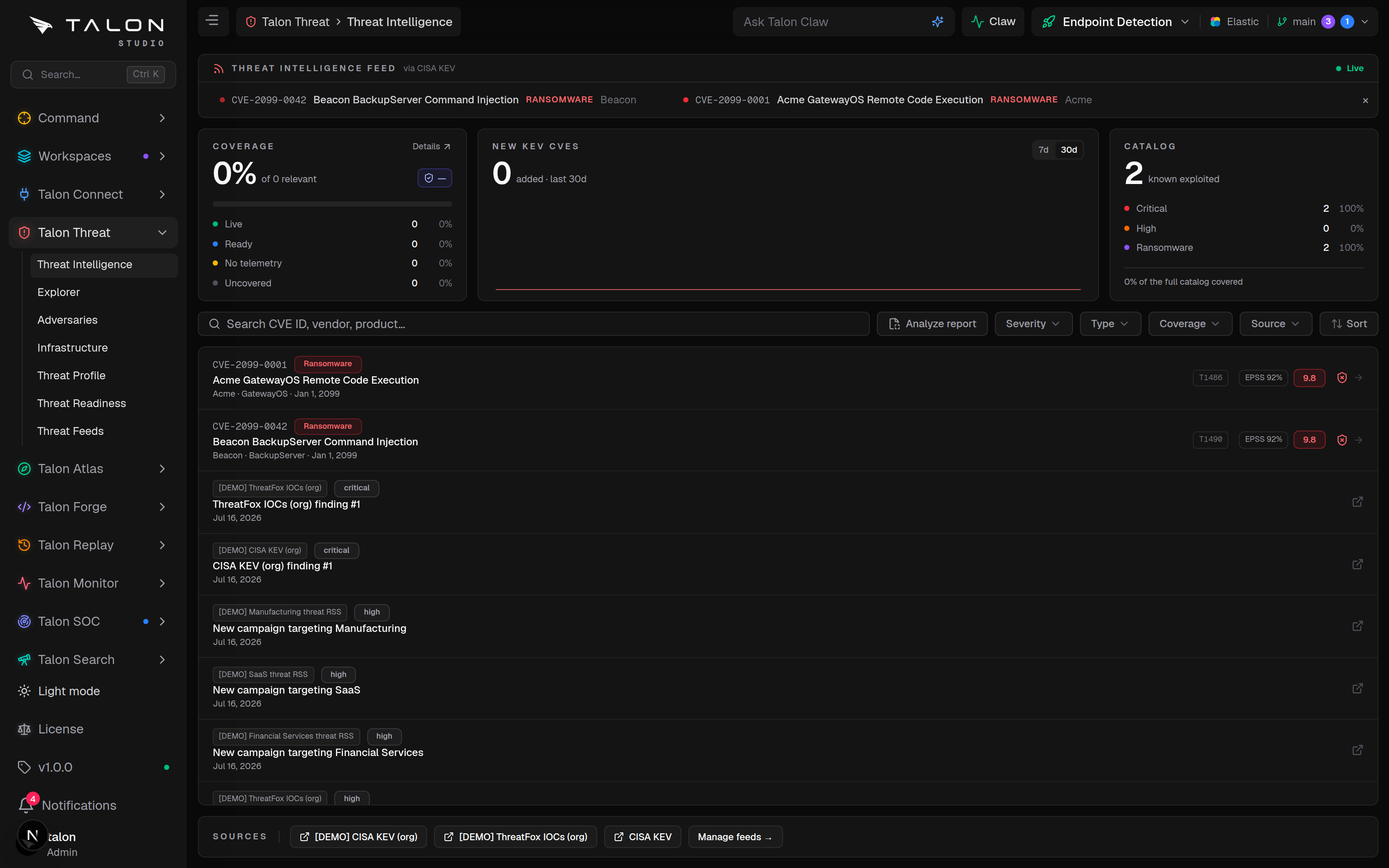
Threat Intelligence — the KEV catalogue with ATT&CK mapping, CVSS, EPSS and per-CVE coverage, listed alongside the latest entries from your other feeds.
/threat-intel/explorer
Explorer — one search across techniques, threat groups, campaigns, malware and tools, mitigations, NIST 800-53 controls and KEV CVEs.
/threat-intel/adversaries
Adversaries — ATT&CK threat groups and campaigns against your workspace's detection coverage.
/threat-intel/infrastructure
Infrastructure — command-and-control IPs from your IOC feeds, mapped by origin, and a generated Splunk IOC-matching search.
/threat-intel/profile
Threat Profile — what you run, which decides which CVEs and threat actors count as relevant.
/threat-intel/models
Threat Models — STRIDE models of your systems, checked against the logs your SIEM has and the detections that cover each threat.
/threat-readiness
Threat Readiness — the priority-weighted share of relevant KEV CVEs you can detect, with a week-over-week trend.
/threat-intel/feeds
Threat Feeds — the built-in and custom intelligence sources, scoped to the organisation or to a workspace and versioned in Git.
CISA KEVMITRE ATT&CKCAPECCVSSEPSSExploit-DBRansomware

How it works

One loop keeps the intelligence fresh. Coverage is not stored with it: it is worked out when you open a page, from the workspace's detections and the connected SIEM's evidence.

KEV sync. The catalogue is fetched from CISA (known_exploited_vulnerabilities.json) and upserted into the local store. After the first sync, a CVE that appears for the first time is badged New for seven days, and one digest of the new CVEs goes to the organisation's notification channels that subscribe to threat-intel events — at critical severity when any of them is linked to ransomware, warning otherwise. The first sync back-fills the whole catalogue without notifying.
ATT&CK mapping. ATT&CK does not reference CVEs directly, so Talon bridges to it: each KEV entry's CWE weaknesses are matched to MITRE CAPEC attack patterns, which name ATT&CK techniques. The Center for Threat-Informed Defense's curated CVE-to-ATT&CK mappings are layered on top, and STIX/TAXII feeds and GitHub Security Advisories add more. A CVE none of these reach shows No mapping.
Enrichment. CVSS v3 base score and severity from the NVD (up to 100 entries per run, each re-checked weekly); EPSS from FIRST.org — the probability the CVE is exploited in the next 30 days, with its percentile; a public exploit flag when Exploit-DB lists one; and CISA's own flag for CVEs known to be used in ransomware campaigns.
Coverage. Each CVE resolves to one of four states, set out below. A rule that exists but cannot run for lack of telemetry is blind: a data gap, never counted as covered.
Readiness score. Threat Readiness filters the catalogue to the CVEs relevant to your Threat Profile (the workspace's own, or the organisation default it inherits), weights each by EPSS, CVSS, ransomware use, public-exploit availability and CISA due-date urgency, and rolls them into one priority-weighted score, trended week over week.
Coverage states
live — a workspace detection that names the CVE is deployed. ready — a library rule about the CVE can run on your SIEM (its sourcetypes and CIM data models are present), but you have not deployed a detection for it. blind — a rule names the CVE, but your SIEM lacks the data it needs; the UI labels this No telemetry. uncovered — no deployed detection, and no rule names the CVE. Blind is kept apart from covered so the score cannot be inflated by rules that will never fire.

Setup

Talon Threat is on by default: the loop runs when the appliance starts and then every hour. These environment variables tune it.

.env
# Optional: raises the NVD request rate for CVSS enrichment
NVD_API_KEY=your-nvd-key
# Optional: loop interval in ms (default 3600000 = 1 hour)
THREAT_INTEL_SYNC_INTERVAL_MS=3600000
# Optional: turn the whole threat-intel loop off
DISABLE_THREAT_INTEL_SYNC=false
NVD_API_KEY
Optional. Without it, CVSS lookups are paced at 5 requests every 31 seconds; with it, 25 every 16 seconds. Enrichment works either way, scoring up to 100 KEV entries per run.
THREAT_INTEL_SYNC_INTERVAL_MS
Optional. Interval of the whole loop — the KEV catalogue, the ATT&CK mappings, NVD, EPSS and Exploit-DB enrichment, and every enabled feed. Default 3600000 (one hour).
DISABLE_THREAT_INTEL_SYNC
Set to true to stop the loop, including the scheduled sync of every feed. A feed's Sync button on Threat Feeds still runs it on demand.
CAPEC_STIX_URL
Optional. Replaces the MITRE CAPEC STIX bundle used for the CWE-to-ATT&CK bridge (default: the mitre/cti bundle on GitHub).
CTID_CVE_MAPPINGS_URL
Optional. Replaces the Center for Threat-Informed Defense CVE-to-ATT&CK mapping CSV (default: the mappings-explorer repository on GitHub).
DISABLE_MITRE_SYNC, MITRE_STIX_URL
The ATT&CK catalogue behind Adversaries, Explorer and technique names syncs at startup and then every 24 hours from MITRE's enterprise-attack STIX bundle. Set DISABLE_MITRE_SYNC=true to stop it, or point MITRE_STIX_URL at a mirror.
Outbound access
The loop fetches from www.cisa.gov, raw.githubusercontent.com (CAPEC, the CTID mappings and ATT&CK), services.nvd.nist.gov, epss.cyentia.com and gitlab.com (Exploit-DB), plus the URL of every enabled feed. A source that cannot be reached is logged and skipped; the rest of the loop carries on. On an appliance with no outbound access, set DISABLE_THREAT_INTEL_SYNC=true and DISABLE_MITRE_SYNC=true.
Coverage needs evidence
Coverage is only as good as your connected telemetry. Connect a SIEM in Talon Connect and let its first sync finish: the sourcetypes and CIM data models it finds are what tell Talon whether a CVE's rule can run, rather than being blind.

Usage

Work the list top-down: rank by exploitability, then close the gaps you have the data to close.
1
Open Threat Intelligence (/threat-intel). KEV CVEs are listed newest first by the date CISA added them, 50 to a page. Search by CVE ID, vendor or product, filter by Severity, Type (Ransomware), Coverage and Source, and use Sort to rank by EPSS instead of date.
2
Click a CVE for its detail: CISA's required action, EPSS, the date added and due date, its ATT&CK techniques, the library rules that name it, your deployed and saved detections, and a Data readiness section showing which rules your SIEM can run and which sourcetypes are missing. The sparkle button in the header (Get more details) hands the CVE to the Threat Hunter agent to investigate against your live coverage.
3
For a ready CVE, deploy the library rule that names it. For an uncovered CVE, author a detection in Forge for the mapped technique.
4
For a blind CVE, treat it as a telemetry gap: the fix is onboarding the missing sourcetype or CIM data, not writing another rule.
5
Open /threat-readiness for the score tailored to your Threat Profile, and set a profile if you have not.
6
Manage sources on /threat-intel/feeds. Feeds are versioned in Git and scoped to the organisation or to a single workspace.
Deployable gap
Actively exploited CVEs your SIEM has the data to detect, but that no detection covers (Data-ready and Uncovered together).
Rule available
A library rule names the CVE, but you have not built a detection yet.
Data-ready
Your SIEM has the telemetry to detect the CVE — a runnable library rule covers one of its techniques — or you already have a detection deployed.
Saved
You have built a detection for the CVE but not deployed it.
Uncovered
No detection and no library rule targets the CVE.
screenshot
The KEV catalogue. Each row shows its ATT&CK technique(s), ransomware flag and coverage; use the Sort control to switch from newest-first to EPSS — high to low and work the most-likely-exploited entries first.
EPSS percentile
Each row shows its EPSS score as a percentage. Hover it for the percentile — for example "97th percentile" — which ranks the CVE's exploitation likelihood against every other scored CVE.
Autonomous proposals (Claw)
When Talon Claw is enabled for the organisation, it proposes KEV detections on its own in two cases: a CVE newly added to the catalogue that the workspace's SIEM has the data to detect; and a standing gap, where a library rule that names the CVE can run on your SIEM, no workspace detection names it yet, and the workspace's own Threat Profile names the affected product (the organisation default is not consulted for this). Proposals wait in Talon Claw → Proposals for someone to confirm them, unless the workspace's Claw autonomy is set to auto; then the agent is dispatched at once and its draft change request is the review gate. Claw never deploys.
Analyze a report
Analyze report turns a pasted vendor write-up or advisory into work. It needs an active workspace, the engineer role on it, and an AI provider in Connect → AI (the button is disabled without one). Give the report a title and at least 100 characters of text: the AI extracts the ATT&CK techniques it describes, every ID is checked against the ATT&CK catalogue and unknown ones are dropped, and each technique is marked covered or not against the rules enabled on the workspace's SIEM. Uncovered techniques queue one Claw proposal for the Detection Engineer; submitting the same report again does not add a second. Nothing runs until you confirm it. The separate Analyze intel report button opens the same kind of text in the assistant panel with the Detection Engineer agent, which proposes draft detections for you to review.