Draw a system as components, trust zones and data flows, answer STRIDE for each element, and see on the diagram which logs your SIEM has and which threats your detections can catch.
What a model holds
Threat Models (/threat-intel/models) lists the active workspace's models. New starts an empty one, Import reads a file, and Start from the example opens a customer portal with eight components, three trust zones, seven data flows and twenty threats.
Components
External entities, processes and data stores. Each takes one of 35 types, such as Okta, an S3 bucket or a Kubernetes cluster, or a blank one. A type brings the log sources it should send and the threats suggested for it.
Trust zones
Named boundaries such as the internet, a VPC or a SaaS tenant. A component sits in at most one.
Data flows
An arrow from one component to another, with a label such as HTTPS or SQL over TLS.
Threats
Each sits on a component or a flow and has a STRIDE category, a statement, ATT&CK technique ids and a response: detect, control (a design control handles it) or accept.
Log sources
What a component should send: one of 28 sources from the catalog, or a sourcetype you name for an in-house log.
Products
What a component runs, such as Windows or Exchange Server, picked from the CISA KEV catalog's names. The Windows and Linux host types bring theirs.
STRIDE is asked per element: Spoofing and Repudiation of an external entity; all six of a process; Tampering, Repudiation, Information disclosure and Denial of service of a data store; Tampering, Information disclosure and Denial of service of a data flow. A category that applies and has no threat is an open question, counted in the page header. It is not a pass. Close one with Write a threat, or with Not applicable and a reason, which is saved in the model and needs no threat written only to accept it.
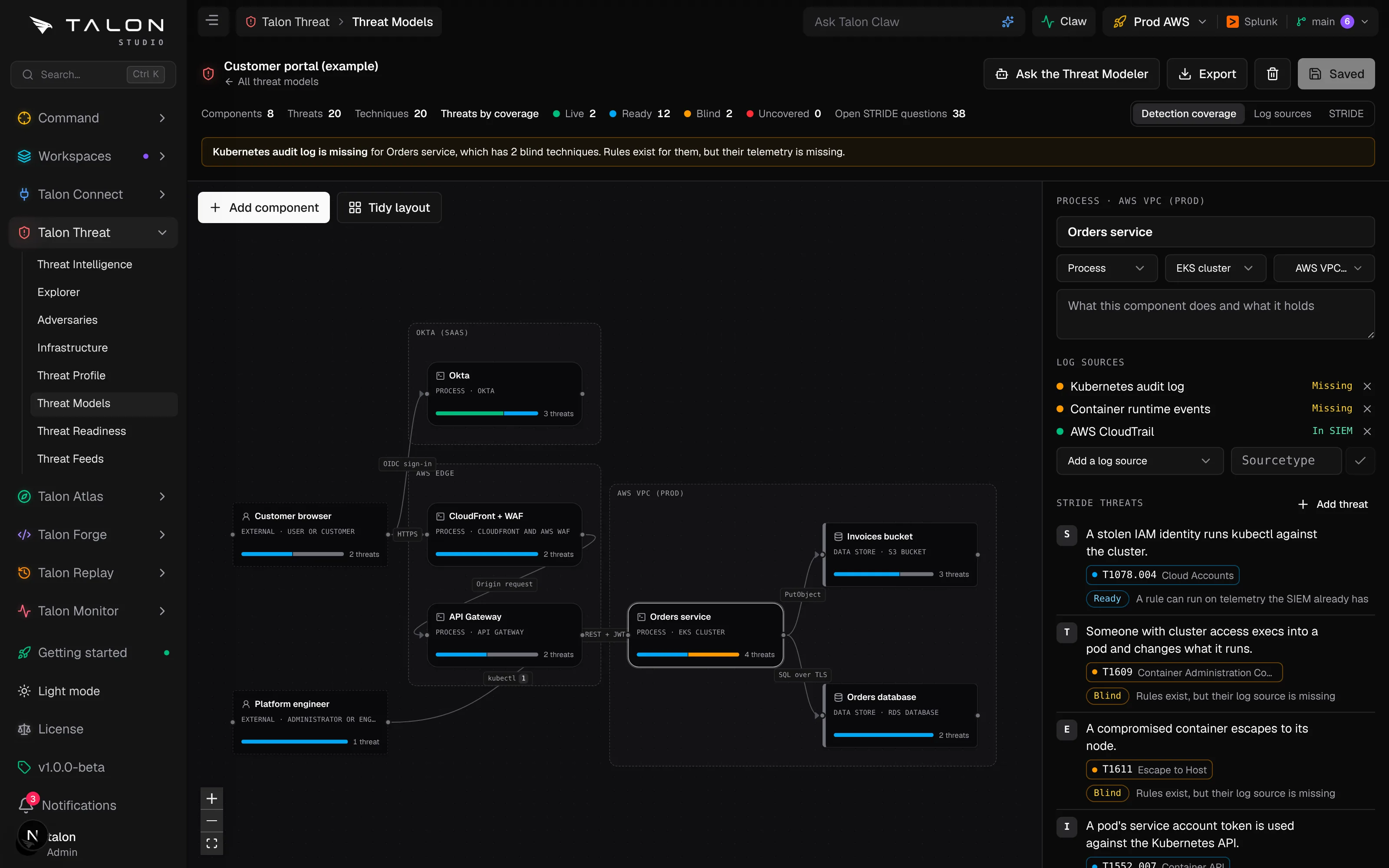
The example model with the Detection coverage overlay, and the Orders service selected.
Coverage on the canvas
Coverage is worked out each time the page opens, against the active workspace. Nothing about it is stored. Each listed log source is matched against the sourcetypes your SIEM reports and reads In SIEM or Missing, or Not checked while there is no SIEM evidence yet. Each technique takes one of five states:
Validated
A deployed Talon detection fired in its latest Talon Monitor test or Talon Replay run. A later failure takes it back to live.
Live
A deployed Talon detection or an enabled SIEM rule maps to it.
Ready
A library rule can run on your telemetry, or a saved detection is not deployed yet.
Blind
Library rules exist, but none can run on the telemetry your SIEM has.
Uncovered
No rule maps to it.
A threat takes its best technique. One live detection is enough to catch it. A threat answered with control or accept shows as such and is not counted as a gap.
Judged on its own component's logs. A rule counts for a threat when it reads one of that component's log sources, or when Talon cannot tell what it reads. A rule on another system's logs does not, and the panel names the logs it reads instead. An external entity is seen through the components it talks to, and a flow through both ends.
Matching is exact or by parent. A detection counts for its own technique and for that technique's parent, and a threat on a parent counts any of its sub-techniques. It never counts for a sibling: a rule for T1110.003 says nothing about T1110.004.
Four overlays.Detection coverage draws a bar of threat states on each component, Log sources a dot for each log, STRIDE the six letters with the open ones outlined in amber, and Threat intel the known exploited vulnerabilities in each component's products.
Next actions. The side panel names what to do next: onboard a missing log that leaves techniques blind, deploy a ready one, draft a detection for an uncovered one, prove that a live detection nobody has tested fires, map threats that have no technique, and answer the open STRIDE questions.
Building one
1
Open Talon Threat → Threat Models and choose New, or Start from the example.
2
Use Add component at the canvas's top left and pick a type. Drag from one component's right edge to another to draw a data flow. Tidy layout arranges the diagram.
3
Select a component to see its log sources and threats in the side panel. Suggested for this component type lists catalog threats to add one at a time, or all at once.
4
Save with the button or Ctrl/Cmd+S. Saving needs the engineer role, or threat:edit on a custom role.
From a gap to a detection
On an uncovered technique, Draft one with the Detection Engineer opens Talon Claw on that agent with the technique and the component it came from.
From gaps to work
Plan the work turns the model's next actions into proposals in Talon Claw, each on the Workboard with a link back to the model. Planning needs the engineer role, and planning again adds nothing that is already waiting.
A log source the SIEM lacks
To the Data Engineer, naming the components that should send it.
A ready rule nobody deployed
To the Detection Engineer, to deploy it.
A technique with no rule
To the Detection Engineer, to draft one.
The model shows the work it started: how many proposals are waiting for approval, the Workboard cards they became, and the detections those cards drafted. Each threat lists the detections drafted for its techniques. Nothing about the work is stored on the model; it is read back each time the page opens.
Threat intel
Actors. Each threat names the priority actors from your Threat Profile that ATT&CK records using its techniques, pinned actors first.
Known exploited vulnerabilities. A component's products are matched to the CISA KEV catalog by exact vendor or product name. The panel counts its known exploited vulnerabilities and how many were used in ransomware campaigns, and the Threat intel overlay shows the same on the canvas.
Files, import & export
Versioned in Git. Each model is one YAML file under Talon/threat-models/ in the workspace repository. Saving writes it as a pending change: commit it to keep it, or discard the change to revert the model. Deleting a model removes its file at your next commit.
OWASP Threat Dragon 2.x JSON, in and out. Trust boundary boxes become zones and STRIDE threats come across; Mitigated becomes control and Not applicable becomes accept. An export carries each not-applicable answer as a Not applicable threat with its reason. Boundary lines and threats in other frameworks are skipped, and the import lists them. Threat Dragon has no ATT&CK field, so an export carries the techniques in each threat's description.
Threagile YAML, in. Technical assets, trust boundaries and communication links come across. Threagile works out its risks when it runs, so the file holds no threats to import.
Talon YAML, in and out, to copy a model to another workspace.
The Threat Modeler
Ask the Threat Modeler opens Talon Claw on the Threat Modeler, a built-in agent in the Threat Intelligence department, asking it to review the model you are on. It reads the model with its live coverage, then answers open STRIDE questions, with a threat or as not applicable, maps threats to ATT&CK, and adds the log sources and products a component is missing. It hands an uncovered technique to the Detection Engineer and missing telemetry to the Data Engineer.
It proposes, you approve
The agent's edits only add to a model: zones, components, flows, threats and log sources. It never removes anything. Approving a proposal opens a draft change request for review, and a proposal made against an older version of the model is refused. See Agents.