Connect Splunk, Microsoft Sentinel, Elastic Security or Google Chronicle, choose what each connection is for, and keep its schema synced into your Evidence Grid.
Supported SIEMs
Talon supports the SIEMs you already run — Splunk is first-class (on-prem or Splunk Cloud), with Microsoft Sentinel, Elastic Security and Google Chronicle (SecOps). All four can be read from and deployed to. Each connection is scoped when you add it — Workspace Only (the default) or Organisation, so every workspace can reuse it — and its token is encrypted at rest with TALON_ENCRYPTION_KEY and never returned by the API.
Adding a connection
1
Open Talon Connect → SIEM (/connect/siem), click Connect SIEM and choose the SIEM — and, for Splunk, On-Prem or Cloud.
2
Under Use this connection for, switch on Read data (import schema and existing detections), Deploy detections (push validated detections back) and, on Splunk only, Test target (run Threat Simulations via HEC). At least one is required.
3
Fill in the fields for that SIEM (below). For a SIEM behind a private CA, open Advanced TLS to paste the CA certificate (PEM) or switch on Allow self-signed TLS.
4
Click Connect. The card appears and the first sync starts at once.
Splunk
Management endpoint — for example https://splunk.internal:8089, or https://<stack>.splunkcloud.com:8089 on Cloud — and an Auth token (a Splunk bearer token). Talon reads the field catalogue and saved searches over REST.
Microsoft Sentinel
Log Analytics workspace URL (https://api.loganalytics.io/v1/workspaces/<id>) and an Auth token: either a pasted Azure AD bearer token, which is short-lived, or a service-principal JSON credential — {"tenantId": …, "clientId": …, "clientSecret": …} — from which Talon mints its own tokens and which does not expire. The Azure workspace identity (Subscription ID, Resource group, Workspace name) is optional for reading — it enables importing analytics rules — and required to deploy.
Elastic
Elasticsearch endpoint (for example https://es.internal:9200) and an Elastic API key. Talon reads data streams and field mappings, and deploys detections as Kibana detection rules.
Chronicle
Project ID, Region and Instance ID — Talon builds the SecOps instance URL from them and uses it for both reading and deploying — and an Auth token: a Google OAuth2 access token or a service-account JSON key, from which Talon mints fresh tokens. Talon reads log types and YARA-L rules, and deploys YARA-L rules.
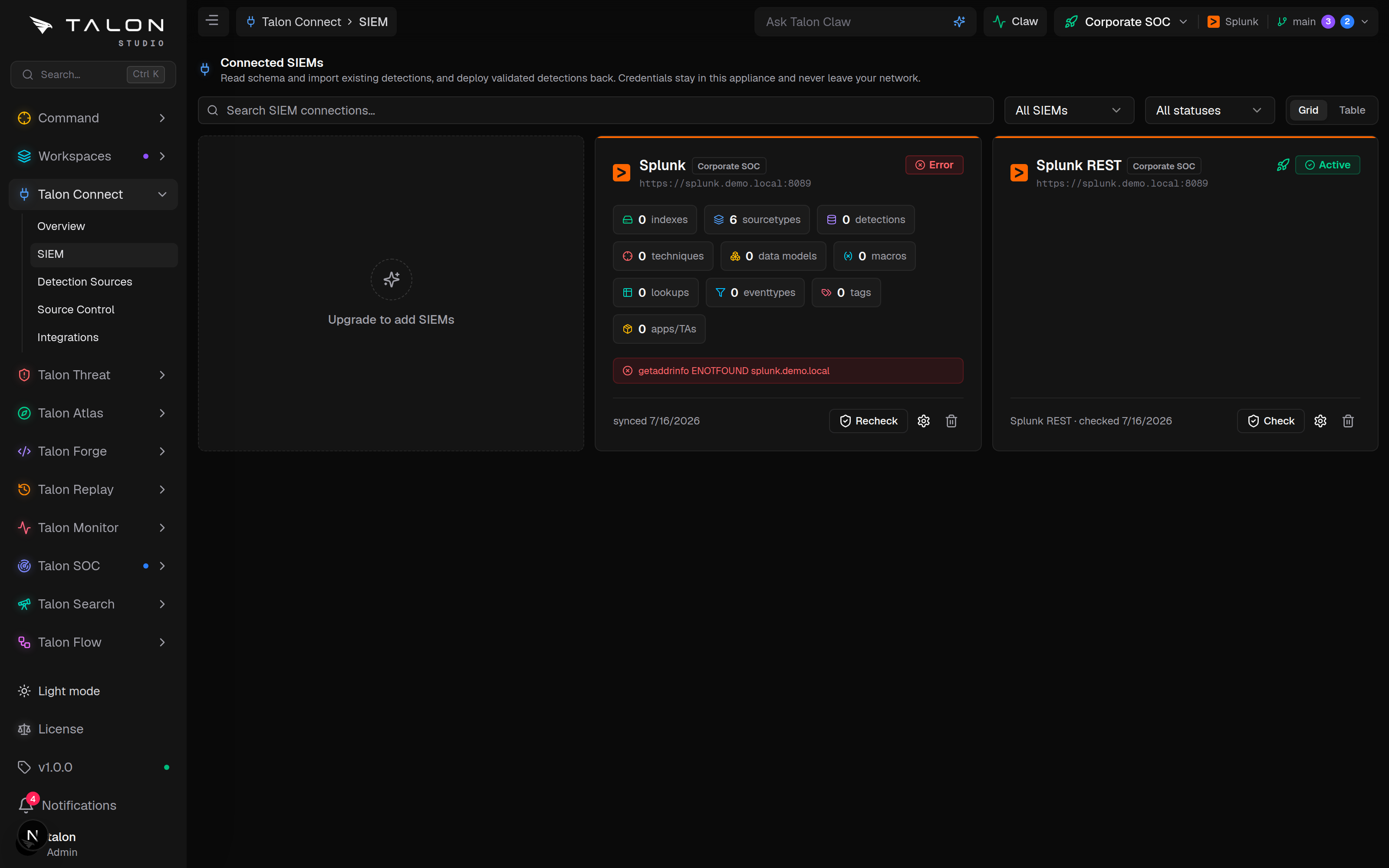
The connected-SIEMs grid. Each card shows the schema objects pulled on the last sync (sourcetypes, detections, data models, macros…) and the connection's live health state — Recheck connection re-verifies a connection on demand, and a failing check surfaces its error on the card.
Importing rules needs more than the query endpoint
Sentinel analytics rules come from Azure Resource Manager, so their import needs the Azure workspace identity above; Talon derives the ARM alertRules URL from it. Elastic detection rules come from Kibana, so their import needs a Kibana base URL (plus an optional space). The connect dialog does not ask for it: add kibanaUrl (and space) under config in the connection's YAML file — under Talon/integrations/siem/ in the workspace repo, or Org/integrations/siem/ for an organisation-wide connection — and commit it. Without it the Elastic schema still syncs, but existing rules are not imported.
Community Edition
The Community Edition allows one SIEM connection and one deployment target per organisation, whatever their scope. Read data and Test target use the connection slot; Deploy detections uses the target slot. At the cap the dashed card reads SIEM limit reached; removing a connection frees its slot.
Deploy and test targets
Deploy detections creates a deployment target for the workspace. On-prem Splunk deploys by REST upload of the packaged app or by SSH / SFTP install (SSH host, port, username, a private key, and Single instance or Deployment server mode with its remote path, such as /opt/splunk/etc/apps or /opt/splunk/etc/deployment-apps); the host key is pinned on first install. Splunk Cloud deploys through ACS. Sentinel, Elastic and Chronicle receive individual rules.
Check on a target card runs its package-install preflight. The release gate wants a target that passed it within the last 30 minutes. Splunk Cloud asks for an ACS JWT and an AppInspect token; other targets for an API token. Tokens entered there are used for that one request and not stored.
Test target (Splunk only) adds a HEC endpoint (for example https://splunk.internal:8088) and HEC token, and Talon creates a quarantined talon_range index for simulation telemetry. Recorded attack-data replay in Talon Replay needs it.
Syncing
A sync calls readSchema() to read stores, datasets, fields and — on Splunk — CIM data models, macros, lookups and apps, and listExistingDetections() to import the SIEM's existing rules. It runs when you connect, again when you change a connection's endpoint or token, every hour after that, and a lighter poll refreshes the index list and event volumes every five minutes. Removing a connection soft-deletes it: detection and deployment history stay.
BACKEND_SYNC_INTERVAL_MS
Full-sync interval. Default 3600000 (one hour).
BACKEND_VOLUME_POLL_INTERVAL_MS
Index-list and volume poll interval. Default 300000 (five minutes); it is skipped if set at or above the full-sync interval.
DISABLE_BACKEND_SYNC
Set to true to stop the background sync loops entirely.
Tip
After onboarding a new sourcetype or index in your SIEM, the five-minute poll picks up the index and its volume, but its fields reach Atlas coverage and Forge only with the next hourly full sync — so give it the hour before treating a missing field as a real gap.
Alert-volume estimation — the "would have fired N times last week" signal on a change request — runs only for Splunk and Sentinel connections; Elastic and Chronicle are excluded.