Talon MonitorTalon Studio v1.0.2-beta
Talon Monitor
Validate detections against your environment's real telemetry and Atomic Red Team tests, catch drift, and flag the ones that can't run in your SIEM before they ship.
What it is
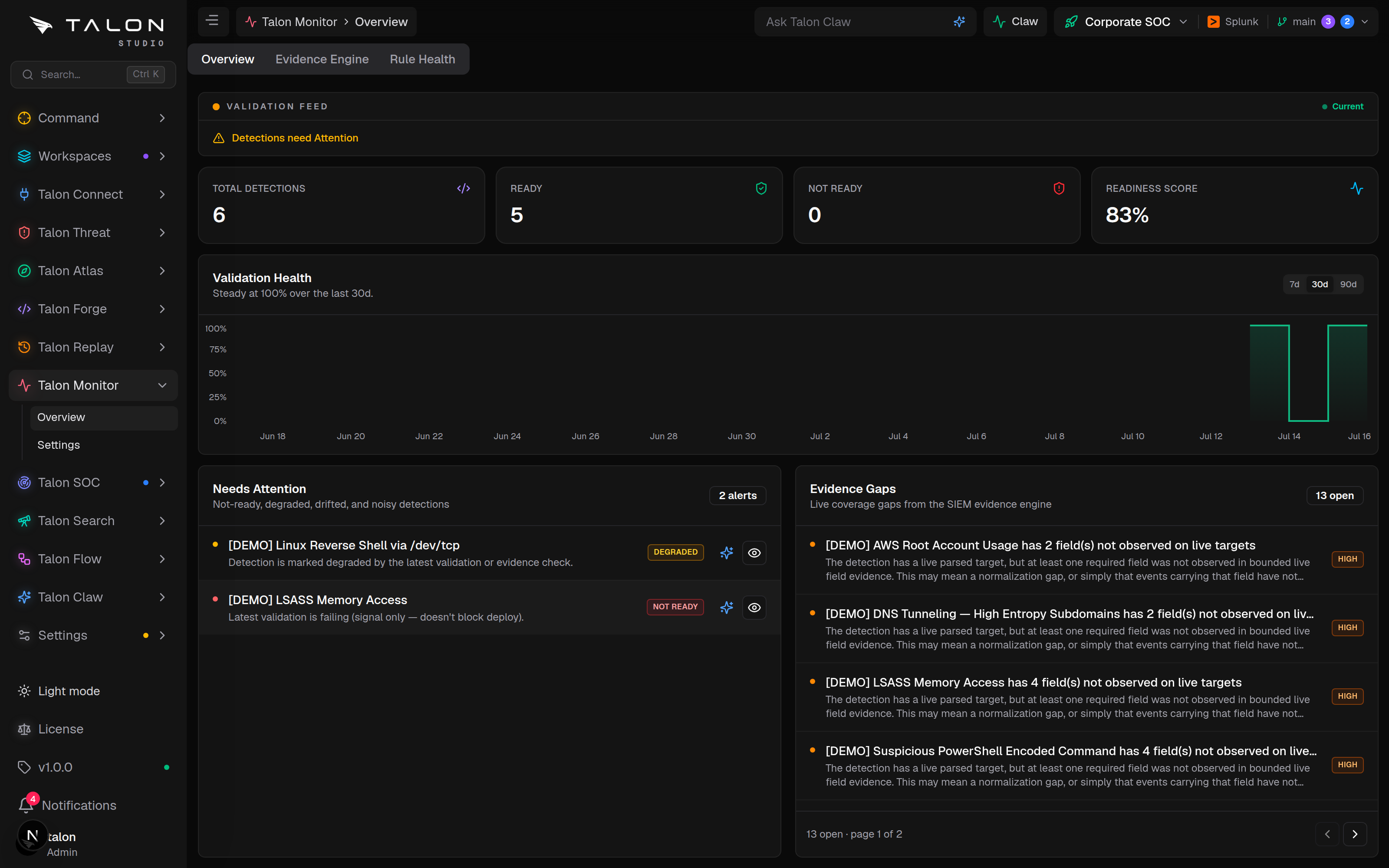
Talon Monitor (/validate) proves a detection actually works — before it ships and after. It checks that your environment carries the data a rule needs, runs the rule against known attack telemetry and your own sample events, and flags drift when a rule that used to pass starts failing. Its three tabs are Overview, Evidence Engine and Rule Health.
How it works
Several kinds of check each record a validation run against a detection:
Atomic Red Team. For a detection's MITRE technique, the change-request check loads a matching ART test (Windows tests first), runs its telemetry through the Sigma rule, and records pass, fail or no_atomic_test. Detections on cloud log sources get no_atomic_test, since ART has no tests for them.
Drift. If a detection that passed readiness now fails it, the run is marked as drift and the detection as degraded, surfaced on the Monitor summary and in Command.
Signal, not a hard gate. Simulation, ART and drift are warn-only signals for a release. Environment readiness is the one that bites: a detection whose latest readiness check failed can't run in the SIEM, so the release gate refuses to package or deploy until you fix or deprecate it. A change request is stricter: it can't be approved or merged until every detection it touches has a pass from the change-request check on its latest commit — an inconclusive no_atomic_test doesn't count.
Setup
1
Connect and sync a SIEM — readiness is judged against the evidence it provides.
2
Give detections a MITRE technique so change-request checks can find a matching Atomic Red Team test, and add golden events (or attack data) to their tests so they have authoritative firing tests of their own.
3
Open /validate for the summary. An admin can re-check every detection at once with Run Check on Talon Monitor → Settings (/validate/settings).
When validation runs
Nothing validates on save. Environment readiness runs when an admin clicks Run Check, when you click Check readiness on a detection, and for every active detection in the workspace whenever content lands on main — a commit from the working tree or a change-request merge. Change-request checks run on every commit to a change-request branch. The only timed re-check rides the Claw cycle, and only for organisations that have switched on the Claw coordinator (off by default): at most once per validation_interval_hours (24 by default) it re-validates the detections the evidence-gap engine flagged as unvalidated, stale, failed or drifted — never the whole organisation. DISABLE_SCHEDULED_VALIDATION=true turns that re-check off while leaving Claw running.
Usage
Watch the Total Detections, Ready, Not Ready and Readiness Score tiles and work the Needs Attention list — degraded, drifted and noisy detections, with Tune with AI and Triage with AI actions; drift usually means a renamed field or a changed sourcetype.
Use the Evidence Engine tab to work evidence gaps one by one — filter by status (open, dismissed, fixed pending, muted), severity or kind, dismiss a gap with an optional reason, or add a mute rule so a gap kind is always ignored for one entity.
Open the Rule Health tab for the other half of the picture: every rule installed in the SIEM — including legacy rules Talon never authored — graded from live evidence. See the next page.
Tip
Treat a no_atomic_test result as "not proven", not a pass. It is recorded when there is no Atomic Red Team test for the technique (or for a cloud log source), when synthetic events didn't match, when the detection has no Sigma rule, or when readiness had no SIEM evidence to check — in every case the rule was never shown to fire, and when the change-request check returns it, the change request can't merge. Golden events in the detection's tests close that gap.