Skip to content
DocumentationAPI ReferenceChangelog
Talon MonitorTalon Studio v1.0.4-beta

Detection Triage

One queue item per detection with an open problem — failing validation or deploys, noise, a broken or silent SIEM rule — tracked from first signal to a verified fix.

The queue

The Triage tab on /validate keeps one item per detection with an open problem, so the signals about one rule collect in one place instead of arriving as separate alerts. A badge on the tab counts the items nobody has picked up yet. An item opens on its own when a signal arrives, and each signal sets its priority:

Validation failing
A validation or simulation run failed. High priority; counted each time it happens.
Deploy failing
A deploy of the detection failed. High priority; counted each time it happens.
Noisy
Triage outcomes and feedback mark it as mostly false positives. Medium priority.
Broken reference
The rule it became in the SIEM leans on a macro, lookup or sourcetype that isn't there. High priority.
Never fires
That rule has not fired in 30 days of the SIEM's scheduler history. Medium priority.

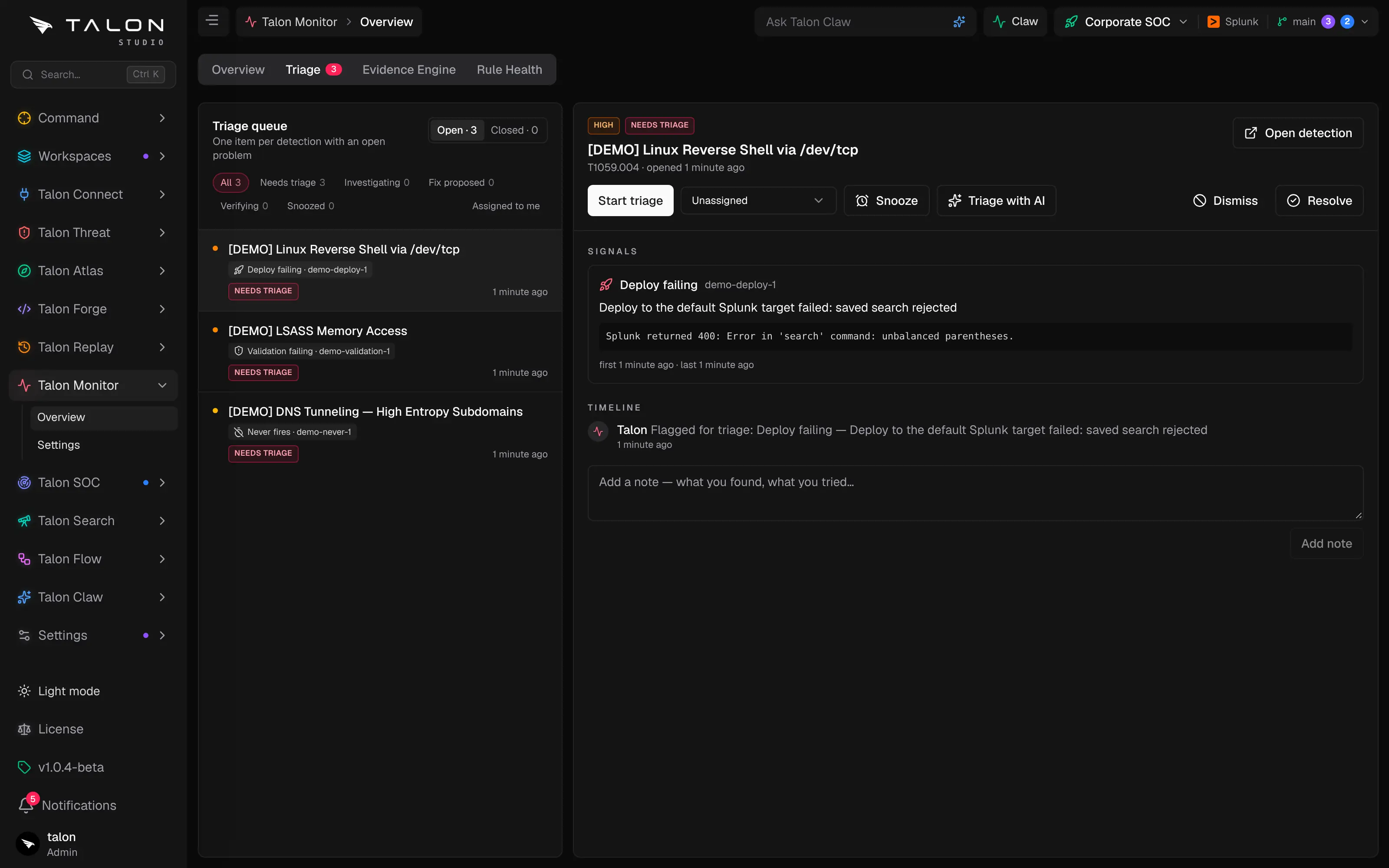
The list switches between Open and Closed, and filters open items by status — Needs triage, Investigating, Fix proposed, Verifying or Snoozed — or to Assigned to me. Broken references and silent rules come from the Claw cycle's rule-health scan, so they appear only once an admin has switched on the Claw coordinator (Talon Claw → Settings, off by default).
Working an item

Start triage moves an item to Investigating; after that a status menu moves it between the open states, and you can assign it to a teammate. Open detection goes to the rule itself. The item keeps a history of its signals and changes, and Add note records what you found.
Snooze hides an item for 1 day, 1 week or 30 days; Wake up now brings it back early.
Triage with AI hands the item to the Triage Analyst agent, which proposes a fix as a change request; the item reads Fix proposed. Validating that change request scores each changed detection on its golden events, before and after. Merging it moves the item to Verifying, and if the same signal comes back, the item returns to Investigating — the fix didn't hold.
Resolve or Dismiss closes an item with a note, and Reopen brings a closed one back. An item also resolves on its own once every signal on it has cleared.
Talon Monitor's Triage tab with the triage queue and one item open
The Triage tab: the queue on the left, filtered by status, and the selected item on the right with its signals, status, assignee, Snooze, Triage with AI, Dismiss and Resolve.
Tip
Tick Detection triage on a Slack, Teams or email destination under Settings → Integrations to hear about new items where your team already works.