Links, agents & automations
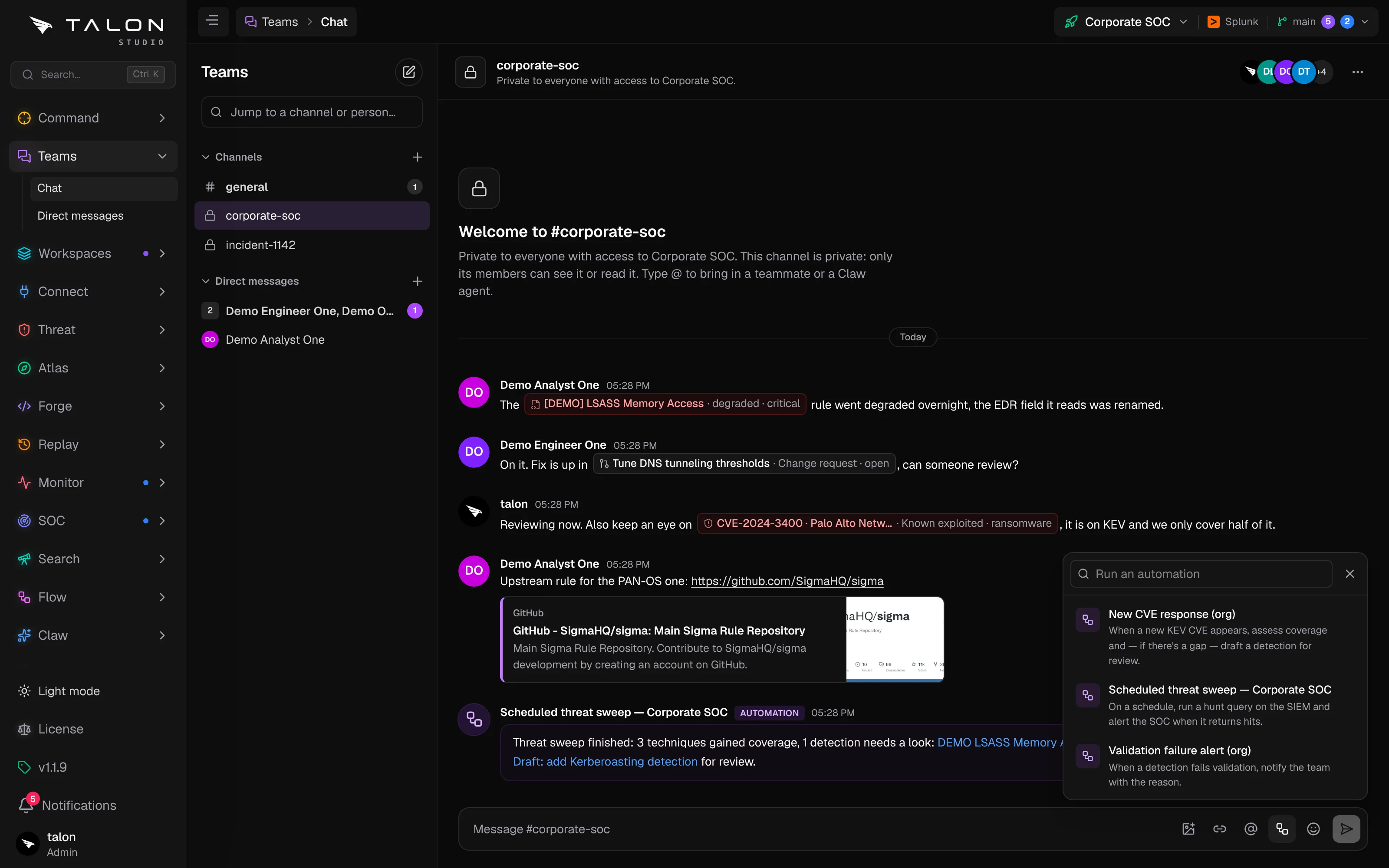
Link cards, detections, cases, hunts, runs, change requests, automations and CVEs into a message, bring in a Claw agent, and run automations that post their results back.
Record links
Type [[, or press the link button in the message box, to search for a card, detection, case, hunt, agent run, change request or automation and drop a link to it. A bare CVE ID such as CVE-2024-3400 becomes a link on its own. Each link shows as a chip with the record's title and its live state, worked out for whoever is reading: someone without access to the record gets a restricted chip with no title, so a link never gives away what it names. A chip turns red when the record needs attention: a failed run, a degraded or failing detection, or a CVE on CISA KEV, with its ransomware flag.
Messages are up to 8,000 characters. @ mentions a person or an agent, and a mention of you raises a toast and counts toward the purple unread badge.
Pictures, previews & GIFs
Claw agents
Mention an agent, such as @threat-hunter, and it answers in the conversation, up to three agents per message. Each reply is a governed agent run (trigger teams_chat), so it is budgeted, audited and propose-only like any other, and View the run in Claw → Agents under the reply opens it. Agents in direct messages and private channels run at organisation level. Bringing an agent in needs claw:operate and a configured AI provider. See Agents.
Automations
Automations can be started from a conversation, and they can write into one.